Saturday, October 11, 2025
Notes - installing Tailscale on a Raspberry Pi (or any Linux device)
You provide the hardware, they provide the software and infrastructure, easy as that
 Daniel Morrisey
Recently, I set up my Raspberry Pi as a Tailscale exit node because I can't trust big companies and my school's internet.
So I did what most people who's Bluesky PDS stopped working and lost access to their old account and now has a Raspberry Pi that's not in use and watches LTT. So I set up my Pi up as a Tailscale exit node.
to install my way as a exit node:
Update stuff:
run this command that does something
and this one
update
install tailscale
advertise as exit node, replace 10.0.0.0 with your "root ip"
for example if your ip is 10.0.0.233 your root ip is 10.0.0.0
if you dont want to run as a exit node run
after you login
update again because you should
go to Tailscale dashboard
click the three dots on your device

click "disable key expiry", then make sure it says "enable key expiry"

then click "edit route settings"
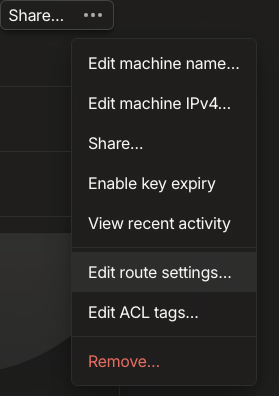
if don't see this click skip this
once you click and you see "unable to relay traffic" message, this is because your device (exit node) needs IP forwarding
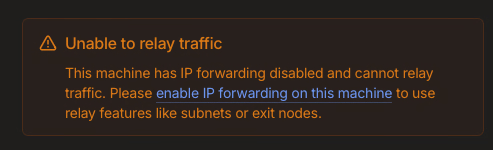
to set up ip forwarding
if your linux device has the /etc/sysctl.d directory run:
if not run
then
then refresh the Tailscale dashboard
click the check box on the route you advertised then click "Use as exit node"
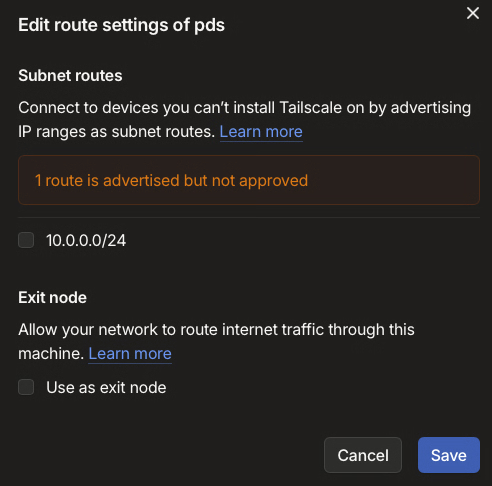
click save
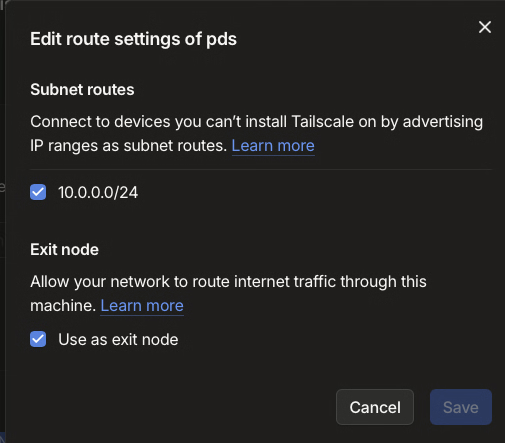
then install Tailscale on your phone, Mac, windows pc, etc here
after thats done follow me on bluesky and check out my website:
Comments